

Yes, your iPhone can be a baby monitor, and the old iPhone in your drawer can be the camera. Install Dozi (free to download) on two iPhones or iPads, scan a QR code, and you have live video, cry alerts on your locked phone, night vision and talk back, in under a minute and without buying any hardware.
This guide shows you how to set it up step by step, where to place the phone, and why the built-in iPhone tricks (FaceTime, Live Listen, Sound Recognition) fall short at night.
| Dozi baby monitor app | FaceTime call | Live Listen + AirPods | Sound Recognition | |
|---|---|---|---|---|
| Live video | ✅ | ✅ | ❌ audio only | ❌ |
| Alerts you when baby cries | ✅ even when locked | ❌ | ❌ | ❌ only on the nursery phone |
| Night vision | ✅ | ❌ | ❌ | ❌ |
| Talk back to your baby | ✅ hold to talk | ⚠️ open mic only | ❌ | ❌ |
| Lullabies and white noise | ✅ with sleep timer | ❌ | ❌ | ❌ |
| Video stays in your home | ✅ no cloud | ❌ goes over the internet | ✅ | ✅ |
| Built for all-night use | ✅ | ❌ | ❌ | ❌ |
What you need
- Two iPhones or iPads, in any mix. An older iPhone you no longer use is perfect for the nursery.
- Both on the same home Wi-Fi. Dozi sends the video directly between them, so it never leaves your home.
- A charger for the device in the nursery.
- The Dozi app on both devices. It is free to download, and every feature is free for your first 3 days.
How to set up your iPhone as a baby monitor
- Install Dozi on both devices from the App Store.
- Choose a role on each. On the device that stays with your baby, tap Baby Device. On the one you keep with you, tap Parent Device.
- Scan the QR code. The baby device shows a QR code. Scan it with your phone and the live video starts. There is no account to create and no login.
- Place the baby device high up with a clear view of the crib, out of reach, and plug it in.
- Allow notifications on your phone when Dozi asks, then lock it and put it down. Dozi will tell you when your baby needs you.
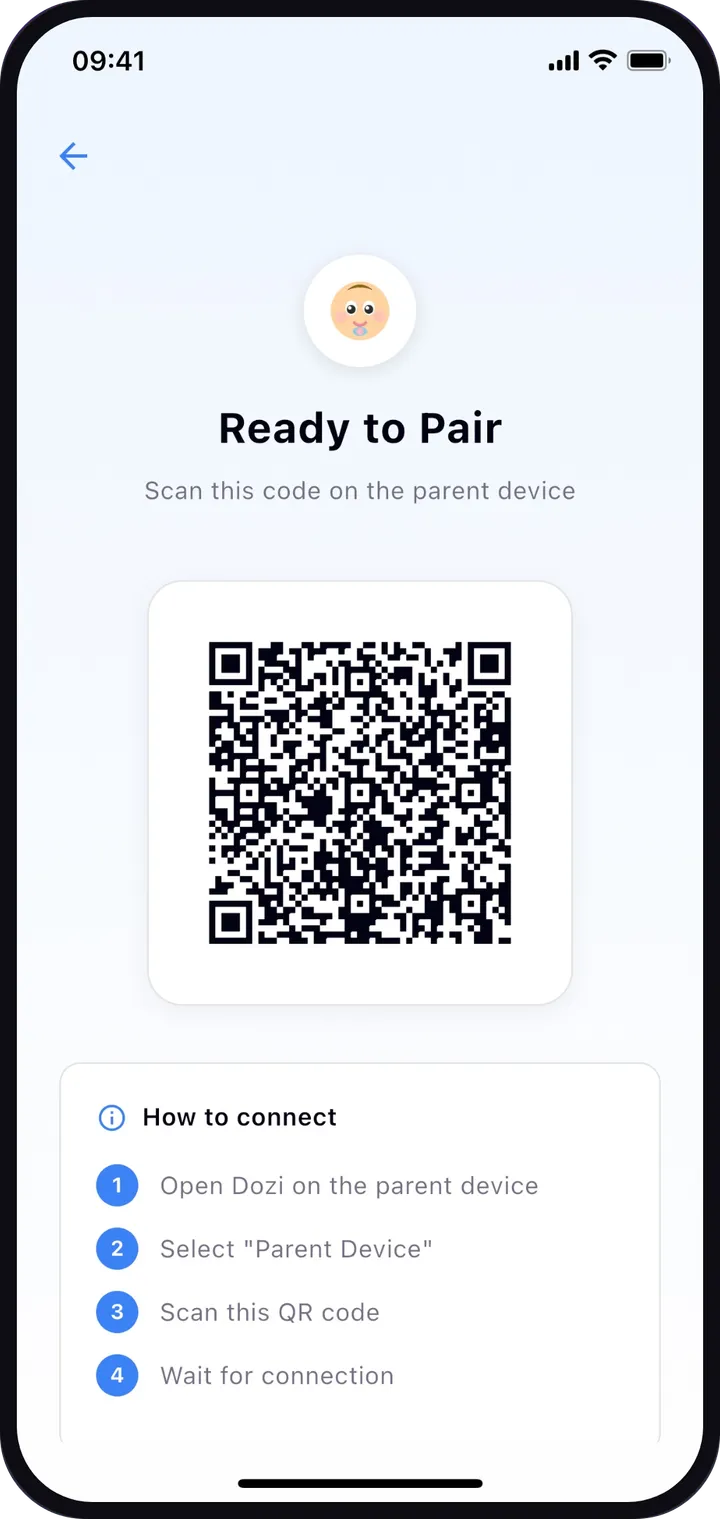
That's it. See how Dozi works for more detail on each step.
What your iPhone baby monitor can do
Cry alerts, even when your phone is locked
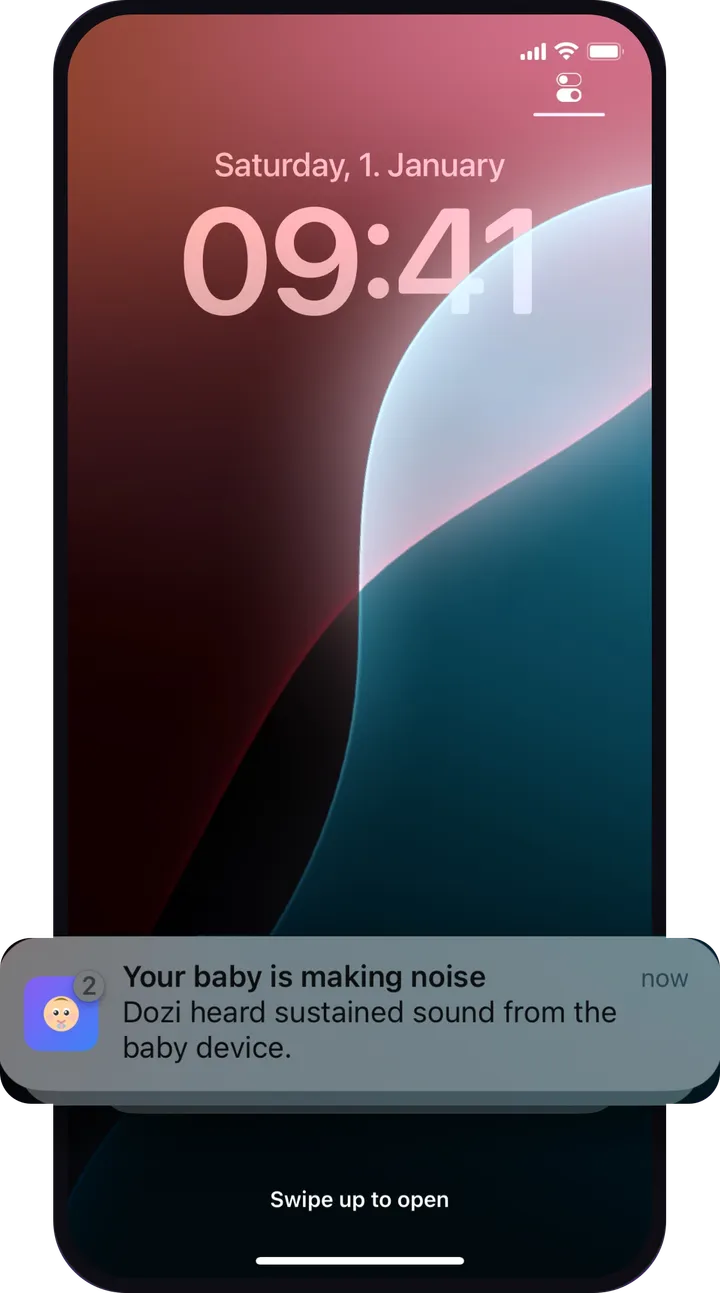
Lock your phone, go to sleep or watch TV. When the baby device hears crying that keeps going, your phone shows a notification straight away. Dozi ignores a single cough or a door closing, learns steady background noise such as a white-noise machine so it isn't mistaken for crying, and pauses alerts while a lullaby is playing.
Night vision in a dark nursery
Tap night vision on your phone and the picture brightens, so you can check on your baby without turning on a light. It boosts the iPhone camera in low light (it isn't an infrared camera), so it works best with a little light in the room, like a night light. The baby device's screen dims to black after a few seconds, so it doesn't light up the nursery.
Talk back and soothing sounds
Hold the talk button and your baby hears your voice through the baby device. You can also play white noise, rain, ocean waves, a heartbeat or a lullaby on the baby device, adjust the volume from your phone, and set a sleep timer of 15 minutes, 30 minutes or 1 hour.
Private by design
Your baby's video goes directly from one of your devices to the other over your Wi-Fi, encrypted, and never to a cloud. Nothing is recorded, there is no account, and only the phone that scanned that session's QR code can connect. Read how Dozi keeps your monitor private.
Where to put the iPhone in the nursery
- High and angled down at the crib, on a shelf or dresser, so you can see the whole sleep space.
- Out of your baby's reach, and never inside or on the edge of the crib.
- Cable at least three feet (about 1 meter) from the crib, as the US Consumer Product Safety Commission advises for every monitor cord.
- Away from noise sources like a fan or vent, so sounds from the room are clear.
- Plugged in. It's best to keep the baby device charging, so streaming doesn't stop because of a low battery.
Why not just use FaceTime or a built-in iPhone feature?
Parents often try these first. They work for a quick check, but none of them is made for nights.
- FaceTime: you can call the nursery iPhone and leave the call open, but it never alerts you when your baby cries, so you have to keep watching. If the call drops at 3 a.m., nothing tells you. The video also travels over the internet, and the two devices usually need two different Apple Accounts to call each other.
- Live Listen with AirPods: Live Listen turns an iPhone into a microphone that plays into your AirPods. It is audio only, it only reaches as far as Bluetooth does, and you have to wear AirPods to hear anything.
- Sound Recognition: under Settings, Accessibility, Sound Recognition, the iPhone can detect a baby crying, but the alert appears on the iPhone that hears it, which is the one in the nursery, not the one with you. Apple also says not to rely on it where someone could be harmed.
That's why the iPhone has no real "baby monitor mode", and why a dedicated app is the way to turn it into one.
Tips for a reliable night
- Turn on Do Not Disturb on the baby device so messages and calls don't light up or ring in the nursery. (If a call does come in on either device, Dozi gives the call the microphone and speaker and tells the other device.)
- Keep Dozi running in the background on your phone. Don't swipe it away, or alerts stop.
- Test it once: go to the room you'll be in, make a sound in the nursery and check your phone alerts you.
- Keep both devices on the same Wi-Fi all night, with the baby device within good range of your router.
Note
Dozi is a video and audio monitor, not a medical device. It doesn't replace safe sleep practices: place your baby on their back, on a firm, flat surface, with nothing else in the crib. See the American Academy of Pediatrics and the Lullaby Trust for full guidance.
Start tonight with the phone you already have
You don't need to buy a baby monitor. With Dozi, your spare iPhone or iPad becomes a private monitor with cry alerts, night vision and talk back in under a minute. It's free to download and free to try for 3 days, with no payment and no sign-up to start. See everything Dozi can do, or download it now and set it up before bedtime.
Frequently asked questions
Can I use my old iPhone as a baby monitor?
Yes. Install Dozi on the old iPhone and on your current phone, choose Baby Device on the old one and Parent Device on yours, then scan the QR code. The old iPhone becomes the camera in the nursery. Keep it plugged in and out of your baby's reach.
Does the iPhone have a built-in baby monitor mode?
No. iOS has no baby monitor mode. Sound Recognition can detect a baby crying, but it only alerts the iPhone that hears the cry, so it can't tell you in another room. To get video and cry alerts on your own phone, you need a baby monitor app such as Dozi.
Can I use an iPad and an iPhone together as a baby monitor?
Yes. Dozi works with any mix of iPhones and iPads, so a spare iPad can watch the baby while your iPhone stays with you, or the other way round.
Will I get an alert if my phone is locked?
With Dozi, yes. When the nursery device hears crying that keeps going, your phone shows a notification even when it is locked, as long as you allowed notifications and Dozi is running in the background.
Is it free to use an iPhone as a baby monitor?
Dozi is free to download and free to try: every feature works for your first 3 days, with no payment and no sign-up needed to start.
Is it safe to leave an iPhone in the nursery overnight?
Yes, if you place it well. Keep it out of your baby's reach and keep the charging cable at least three feet from any part of the crib, as the US Consumer Product Safety Commission advises for all monitor cords. Never put the phone inside the crib.
First published . This guide is general information, not medical advice.